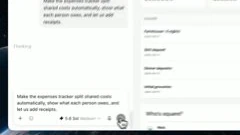
The tutorial gives an existing site a second request, then shows its revised expense view. Keeping the request and the artifact together makes user control part of the demonstration.
Select a word to see its corresponding source frame. Use the arrow keys within the word buttons to step through. Frames may stay similar when a shot holds.
“add receipts, and see what they owe.”
Decoded frame 72.614 s · first frame at or after the estimated word onset.
Reading · interpretation
Keep the requested change beside the existing page
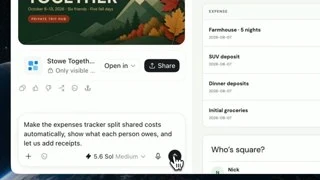
The first two word frames show the completed revision request in the composer and the earlier expense view to its right. The requested receipt support is visible as text; an actual receipt upload is not shown in these frames.
These seven machine-transcribed words agree with the available caption passage. The full comparison contains errors and disagreements elsewhere, especially product names and several dictated phrases. This short excerpt's onsets are still machine estimates.
Words 1–2
Keep the requested change beside the existing page
The first two word frames show the completed revision request in the composer and the earlier expense view to its right. The requested receipt support is visible as text; an actual receipt upload is not shown in these frames.
Words 3–4
Widen the view when the result becomes the subject
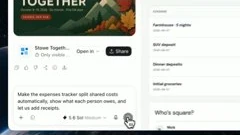
By these word onsets, the composition has moved to the updated expense page. Summary amounts occupy the top of the result, with the request and response beside them. The transition joins an instruction to an inspectable output without showing all the intervening work.
Words 5–7
Hold the financial summary through the payoff
The revised expense view stays visible through the end of the clause. Its totals and rows give the statement a concrete referent. Their presence demonstrates the displayed artifact, not the independent correctness of its arithmetic.
02 / Directing attention
How the frame supports the sentence.
Let the presenter establish the task
A frontal desk view and a closer three-quarter angle handle explanation and transitions between examples. When the demo matters, the software becomes the main image and the presenter remains in a small upper-right inset.
Keep context above the composer
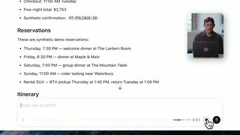
The first long dictated request holds a close software view with trip details above the input waveform. It is a sustained context-and-input composition, rather than a separate shot for every requested feature. The written prompt appears after dictation finishes.
Give instruction and artifact neighboring space
During revision, the request occupies the left and the site occupies the right. The wider result view lets the audience connect the requested expense behavior to the visible summary. The small presenter inset briefly disappears around the change, leaving the interface as the focus.
Show the kind of destination before explaining how to request it. ~0:15 ↗An overhead arrival and laptop detail lead into the presenter, then a browser preview of a trip site and its itinerary.Make the request concrete while preserving its source context. ~0:47 ↗Trip details remain above a recording waveform; the dictated request later appears as composer text.Make revision an observable part of the workflow. ~1:17 ↗The existing expense page sits beside the recorded request, followed by a reframed view of the updated expense summary.Show how the artifact is requested, found and shared. ~2:08 ↗The dashboard's composer records and displays the instruction, then the Sites list and sharing dialog appear.
03 / Beyond the excerpt
The full argument.
An opening introduction promises a usable website and previews a trip site. The tutorial then returns to the presenter, explains the context and dictates a detailed building request over the actual composer. A site appears, followed by a second request about shared expenses and a revised expense view. Sharing is introduced as another decision, and a professional dashboard extends the use case to recurring work. The closing locates the sites and their links. The first preview and later trip example have different titles and designs: this is an edited tutorial organized by a use case, not one uninterrupted record of a single build.
Passage boundaries below are approximate. Speech is paraphrased; the word explorer above contains the short quotation. Editorial jobs are interpretations.
The closing joins group planning and an ongoing dashboard as two uses of the same capability.
Picture · observation
The presenter returns before the closing typography and mark.
Editorial job · Resolve the two examples into a concise product proposition.
04 / Check the actual image change
Two transitions in adjacent frames.
These pairs use neighboring decoded source frames. Their timestamps are frame evidence; they do not make the speech alignment exact.
Hard cut from presenter to the dictated request
Before · 32.032 sAfter · 32.074 s
The presenter fills the main image at 32.032 seconds. At 32.074 the software takes over, with trip details above the recording waveform and the presenter in an inset. The composition changes as the general explanation becomes a specific instruction.
The earlier expense layout and completed request are visible at 72.906 seconds. At 72.948 an updated view appears within a brief blurred reframe, which continues through the neighboring frames. This is an edited change of state and framing, not continuous evidence of the time needed to perform the revision.
Build a demo around an initial artifact, one meaningful revision and a result the audience can inspect. Hold the request's context during dictation, then give the changed output enough space and time. Verify the actual Poe behavior, including sharing or scheduled execution, whenever the recorded claim depends on it.
The inspected images show a revision request, a changed expense page, a sharing request and a scheduling request. They do not establish recipient access, a future scheduled run, receipt-upload success, calculation correctness or real build latency. The source's presenter inset does not change the all-hands requirement for separate talking-head and presentation videos.
Review basis
The full machine transcript was read; 479 estimated words were mapped to source frames. The visual review inspected 281 half-second sample positions, the 7 selected word frames and these 2 native transition windows. Available caption differences were checked. No continuous playback or human listening verification. Method and timing limits.